Home  /  SDI /  Converters
Reference

HDMI to SDI Converter with Signal EQ & Re-Clocking

Next Gen. Solid HDMI to SDI Converter with Built-in Re-clocking

SDI-HDSDXPROUPC 813982020924
Clearance In stockHDMI to SDI Converter with Signal EQ & Re-Clocking – KanexPro SDI-HDSDXPRO
Trade pricing and stock
Specifications, drawings and documents stay open to everyone. Net pricing, stock by warehouse and ordering need an approved trade account.

Approval is usually same working day.

Overview

The KanexPro next generation of HDMI to SDI converters are designed for converting single –HDMI signal into two 3G-SDI, HD-SDI signals in professional applications involving broadcasting, post –production and filming. It auto detects input signals converting the output resolution to correct format.

Applications:

Perfect for broadcasting from HDMI sources such as HDMI cameras and laptops to SDI displays. Used in surveillance systems, rental & staging facilities, post-production, TV studio, digital cinema, or other A/V applications.

Key features
  • Get the supreme quality HDMI conversion to HD-SDI
  • SDI loop output for duplication or broadcasting
  • Built-in re-clocking & equalization
  • Supports 2-channel audio
  • Supports multiple video resolutions:
  • SDI 525i, 625i • HD: 720p 24, 25,30,50 & 60 Hz
  • HD: 1080i 50 & 60 Hz.
  • HD: 1080p 24, 25,30, 50 & 60 Hz
  • 3G mode length up to 130m
  • HD mode length up to: 170m
  • SD mode length up to 300m
  • Supports conversion to SMPTE 425M Level A 1080p 50/59.94/60 4:2:2 10-bit
  • Supports cascading of multiple SDI's in application
  • Automatically switches between SD, HD and 3G-SDI standards
  • Compact & ruggedized size makes perfect mobile broadcasting hardware
  • Micro-USB Port for firmware update
  • Locking power supply & mounting ears

Note: RG59 cable is required for SDI transmission; we recommend a 75-ohm high quality coaxial cable.

Video Input

  • Input: 1 x HDMI
  • Input Connector: 1 x HDMI female
  • Input Video Signal: DVI/ HDMI

Video Output

  • Output: 2 X SDI BNC 
  • Output connector: BNC
  • Output Video Signal: SD/HD/3G SDI

Resolutions (HDTV)

  • 1080p,1920 x 1080
  • 720p; 1280 x 720
  • 1280 x 720, 480i (NTSC mode) 576i Standard PAL mode

Enviromental

  • Operating Temperature: 0°C to +70°C
  • Operating Humidity: 10% to 85 % RH (no condensation)
  • Storage Temperature: -10°C to +80°C
  • Storage Humidity: 5% to 90 % RH (no condensation)
  • Regulatory Approvals Converter: FCC, CE, UL
  • Regulatory Approvals Power Supply: FCC, CE, UL

Mechanical

  • Size: (LWH): 3.14"x1.61"x0.98"
  • Weight (net): 0.33 lbs (150g)

Power Requirements

  • External power supply: 7.5V -15V

Waranty

  • 3 Year parts & labor

Package Contents: 

  • HDMI to SDI converter
  • DC power supply 
  • Operation manual 
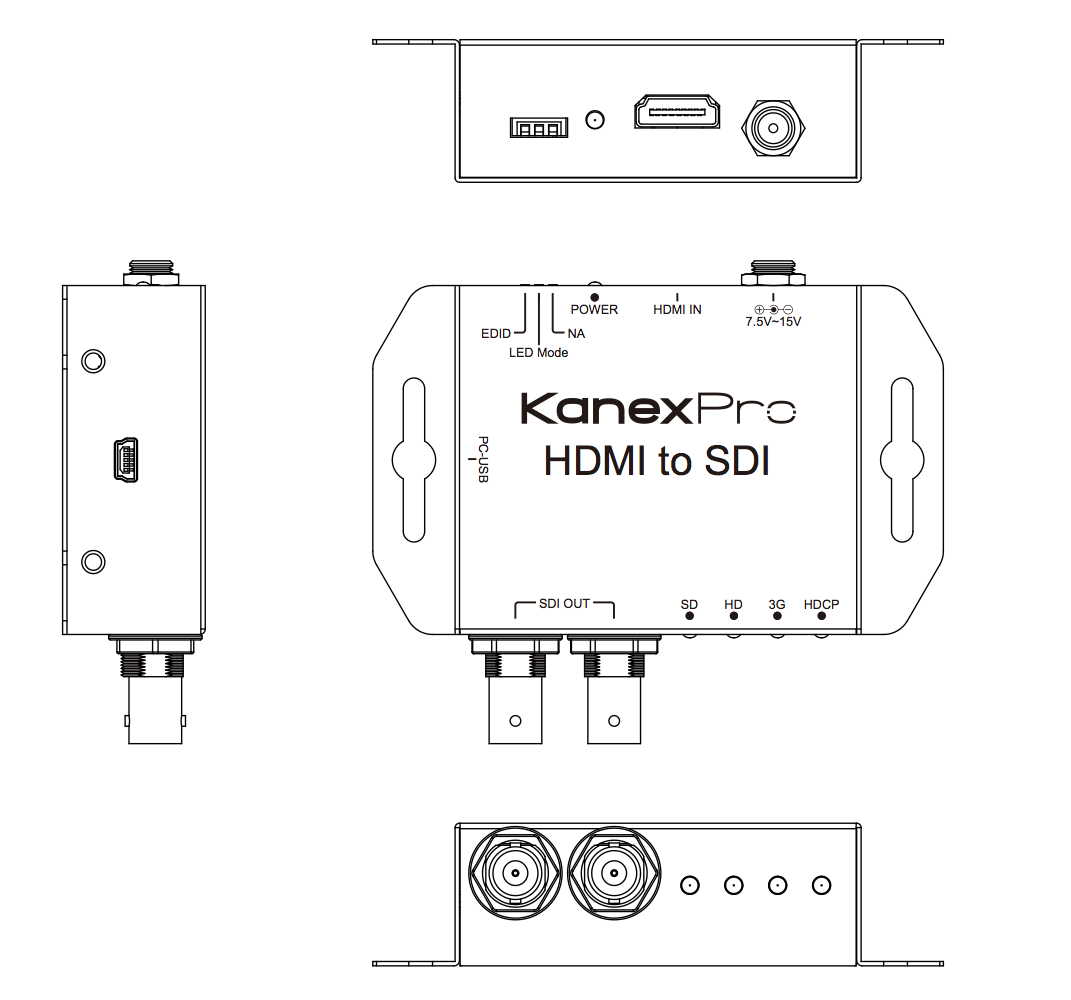
HDMI to SDI Converter with Signal EQ & Re-Clocking panel drawing
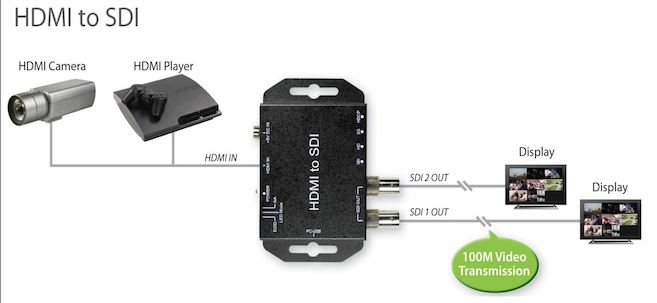
HDMI to SDI Converter with Signal EQ & Re-Clocking system diagram
What SDI standards does the SDI-HDSDXPRO output, and does it auto-switch between them?
It converts a single HDMI input to SD-SDI (SMPTE 259M), HD-SDI (SMPTE 292M), and 3G-SDI (SMPTE 424M/425M) on its two SDI BNC outputs, and automatically switches between SD, HD, and 3G-SDI standards based on the input signal.
What video resolutions and frame rates are supported?
Supported resolutions are SD 525i/625i, HD 720p at 24/25/30/50/60Hz, 1080i at 50/60Hz, 1080p at 24/25/30/50/60Hz, and 2K at 2048x1080 24p/30p, with conversion to SMPTE 425M Level A 1080p 50/59.94/60Hz at 4:2:2 10-bit.
How is EDID handled by this converter?
A 3-pin DIP switch controls EDID behavior: pin ON (up) selects the default EDID, and pin OFF (down) puts the unit into EDID learning mode, which reads the EDID from a connected HDMI monitor.
How do I run the EDID learning process?
Turn off the unit with the EDID DIP pin pulled down (OFF), connect a TV or monitor through the HDMI port, then power the unit on. The status LEDs cycle through a start-to-finish sequence to confirm EDID learning is complete, after which the HDMI source can be connected.
What is included in the box?
The package includes the HDMI to SDI converter, a DC power supply, and an operation manual.
What are the physical dimensions and mounting options?
The manual's Mechanical table lists a housing dimension of 4.09 in (L) x 2.49 in (W) x 1.02 in (H) (104mm x 63.3mm x 26mm); the unit ships with a locking power supply and mounting ears for rack or surface mounting.
Do I need a specific coaxial cable type for SDI output?
Yes. RG6 or RG59 (75 Ohm) coaxial cable is required for SDI transmission; KanexPro recommends a high quality 75 Ohm coaxial cable such as RG59 for best results.
The LED indicators show an unexpected format after connecting a source. What does that mean?
With the LED Mode DIP pin OFF, the SD/HD/3G/HDCP LEDs indicate the detected resolution per the LED table (for example, only the HDCP LED lit indicates no supported signal is detected). Confirm the source resolution matches a supported mode and that the HDMI cable is properly seated.
What deployment scenarios suit the SDI-HDSDXPRO?
Its compact, ruggedized housing and built-in re-clocking make it suited for mobile broadcasting, post-production, and filming setups that need to convert a single HDMI source into two SDI loop-through feeds for duplication or downstream broadcast equipment.
Why does built-in re-clocking and equalization matter for broadcast applications?
Re-clocking and equalization clean up and retime the outgoing SDI signal, helping it drive longer coaxial cable runs to downstream broadcast or recording equipment with a stable signal.
in the same range
Sign in for trade pricing View
in the same range
Sign in for trade pricing View
in the same range
Sign in for trade pricing View
in the same range
Sign in for trade pricing View