Home  /  Audio /  Extractor
Reference

4K HDMI eARC/ARC Audio Extractor

Extract High-Quality eARC/ARC Audio from Any TV — Full 4K60 HDR Video Pass-Through
AUD-DEBEDEARC-4KUPC 813982023932
Promo In stock4K HDMI eARC/ARC Audio Extractor – KanexPro AUD-DEBEDEARC-4K
Trade pricing and stock
Specifications, drawings and documents stay open to everyone. Net pricing, stock by warehouse and ordering need an approved trade account.

Approval is usually same working day.

Overview

The KanexPro AUD-DEBEDEARC-4K extracts eARC and ARC audio from any compatible TV and routes high-quality Dolby Atmos, DTS:X, TrueHD, and up to 7.1-channel surround to your amplifier or AV receiver via a dedicated HDMI audio output — no need to upgrade your existing audio equipment. Video passes through at full 4K60 4:4:4 with HDR, HDR10, HDR10+, and Dolby Vision completely intact. Built-in signal equalization, retiming, and advanced EDID management ensure rock-solid performance, while CEC pass-through lets a single TV remote control the entire chain. USB-powered and compact, it installs in seconds behind any screen.

Key features
  • Extracts eARC/ARC audio from TV and outputs via dedicated HDMI audio port (720p black screen) to any AVR
  • Supports Dolby Atmos, TrueHD, DD+, DTS:X, DTS-HD Master, DTS ES 6.1, LPCM 7.1, and PCM 2.0
  • Transparent 4K60 4:4:4 video pass-through at 18 Gbps — zero signal degradation to your display
  • Full HDR pass-through: HDR, HDR10, HDR10+, and Dolby Vision preserved end-to-end
  • Built-in equalizer, retiming, and driver for stable, reliable HDMI signal delivery
  • Advanced EDID management & CEC pass-through — one remote controls the entire system
  • VESA support up to QSXGA @ 60 Hz — compact aluminium enclosure, USB-powered
HDMI / HDCP HDMI 2.0b • HDCP 2.3 / 1.x
Video Resolution Up to 4K2K @ 60 Hz 4:4:4 • VESA up to QSXGA @ 60 Hz
Color Depth 8/10/12-bit (1080p60) • 8-bit (4K60 4:4:4) • 8/10/12-bit (4K60 4:2:2/4:2:0)
HDR Formats HDR • HDR10 • HDR10+ • Dolby Vision
Audio Formats PCM 2.0, LPCM 5.1/7.1, DD, DD+, TrueHD, Atmos, DTS 5.1, DTS ES 6.1, DTS HRA, DTS-HD MA, DTS:X
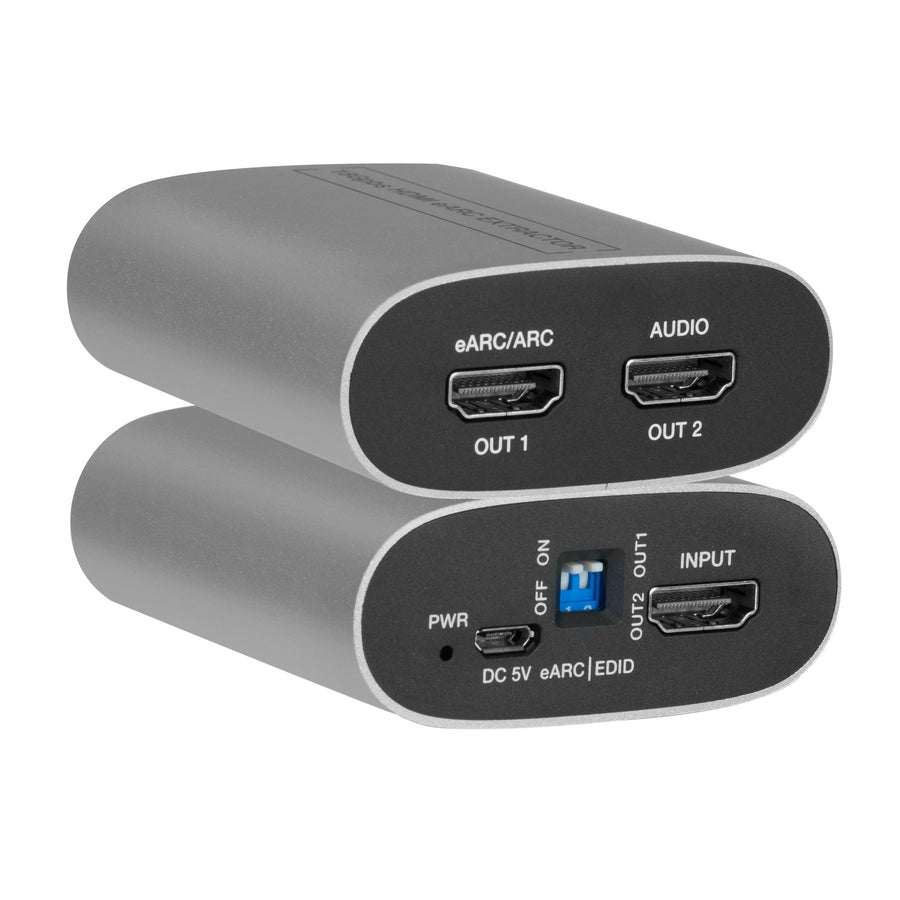
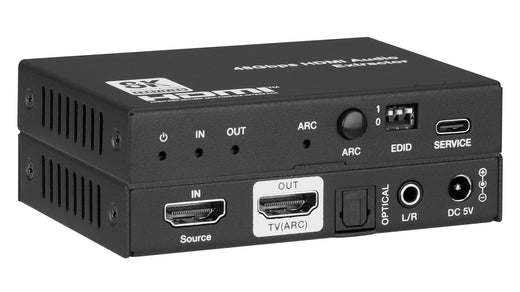
HDMI Ports 1× HDMI In • 1× HDMI eARC/ARC Out • 1× HDMI Audio Out
ESD Protection ±8 kV air-gap • ±4 kV contact (Human Body Model)
Enclosure Aluminium • Silver • 65 × 70 × 27 mm • 83 g
Power USB 5 V / 500 mA • 1.75 W max
Environment 32–104 °F (0–40 °C) • 20–90% RH (no condensation)
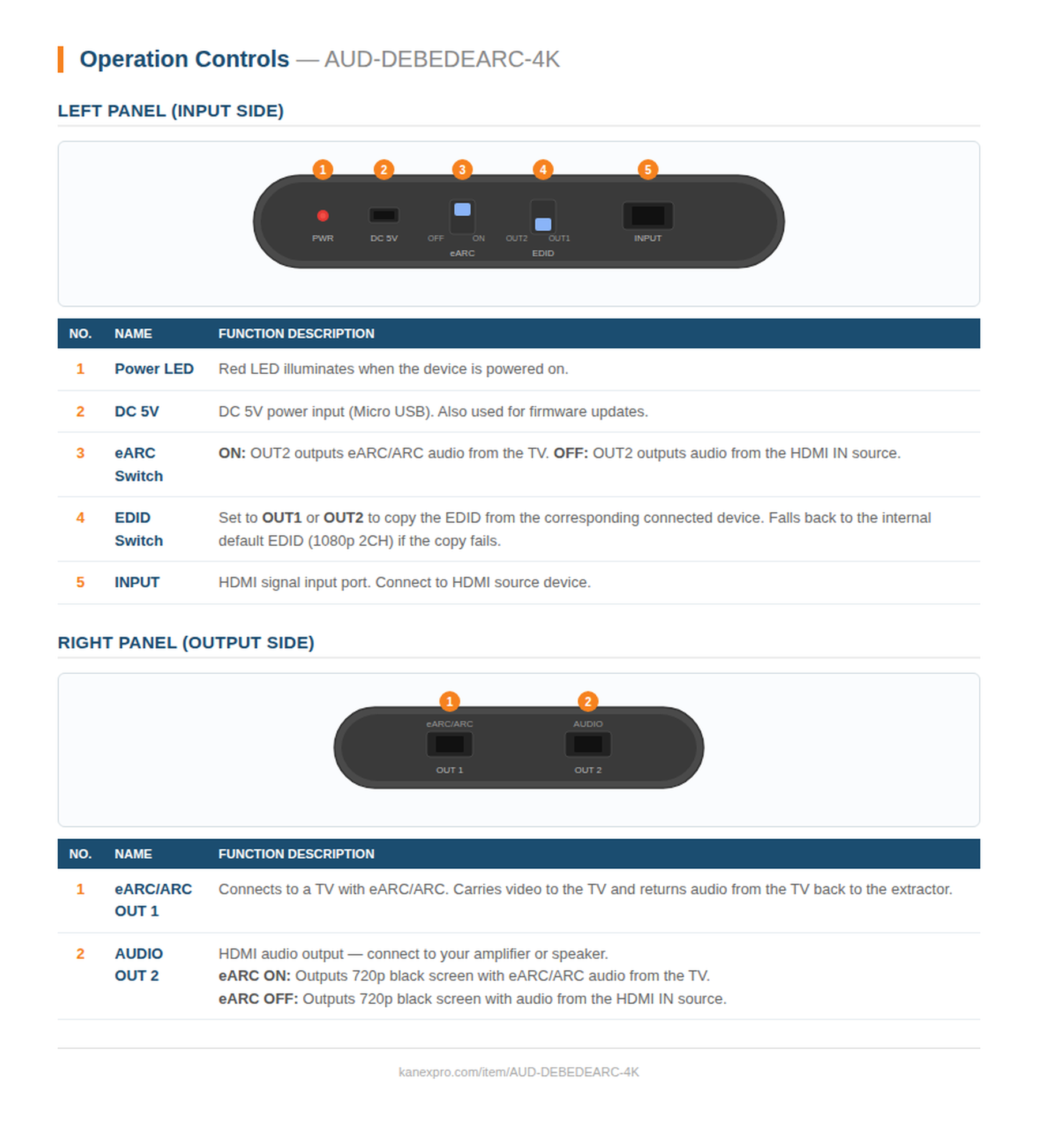
4K HDMI eARC/ARC Audio Extractor panel drawing
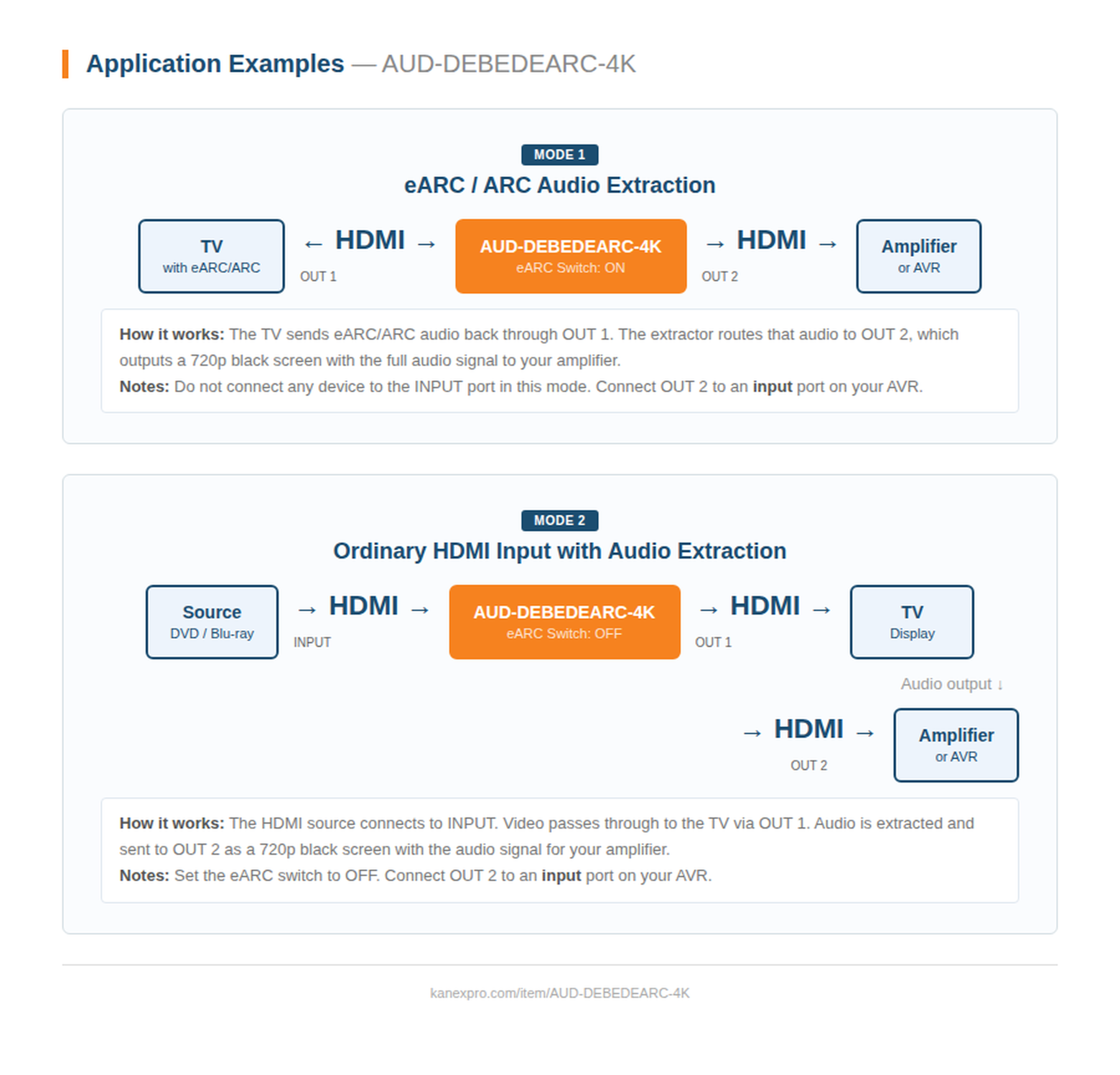
4K HDMI eARC/ARC Audio Extractor system diagram
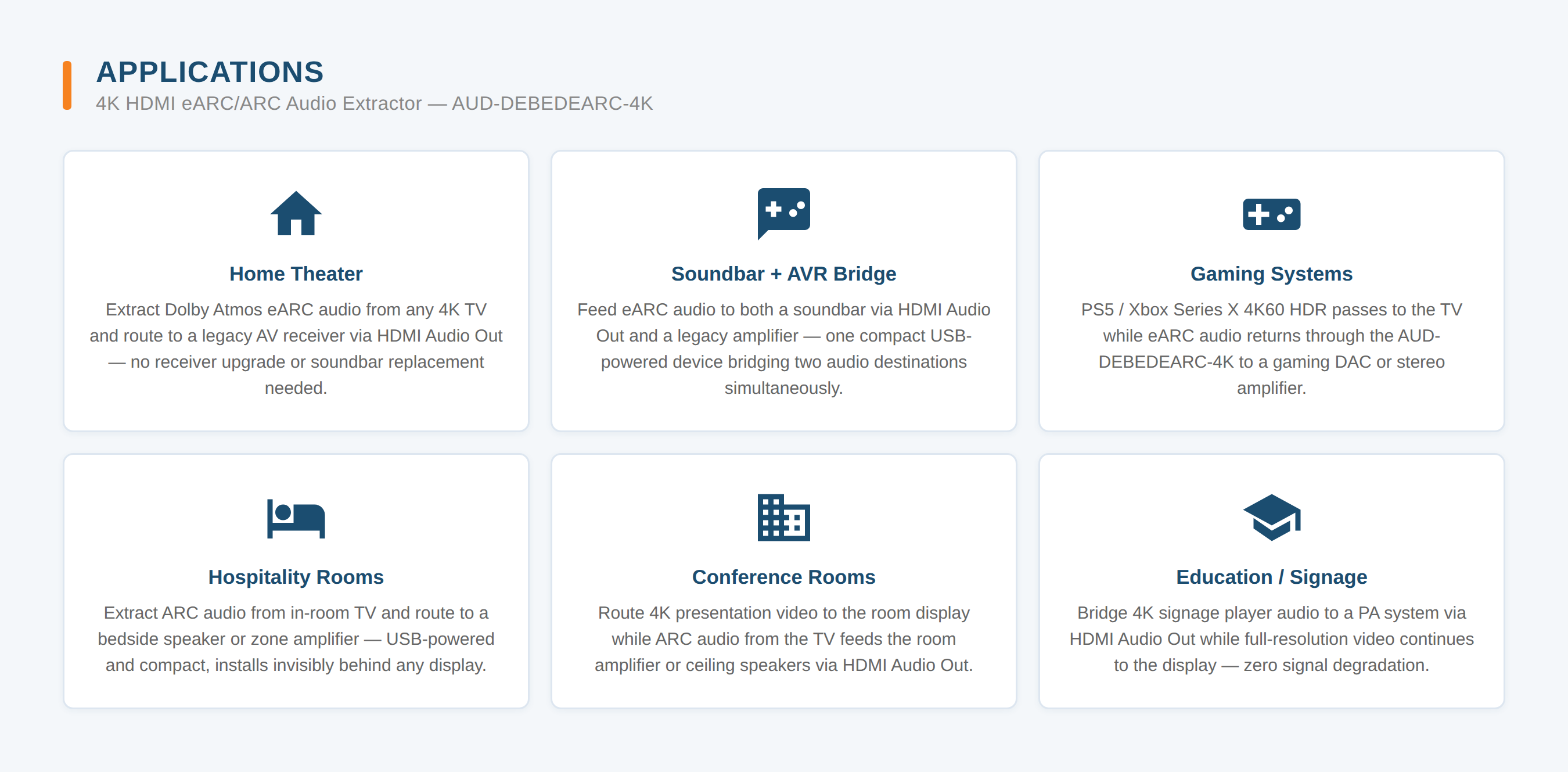
4K HDMI eARC/ARC Audio Extractor applications
What video bandwidth and resolution does the AUD-DEBEDEARC-4K support?
It is HDMI 2.0b and HDCP 2.3/1.x compliant, supporting 18Gbps video bandwidth with resolution up to 4K2K@60Hz 4:4:4, and VESA formats up to QSXGA@60Hz.
What color depth is supported at each resolution?
Color depth is 8, 10, or 12-bit at 1080p@60Hz; 8-bit only at 4K2K@60Hz YCbCr 4:4:4; and 8, 10, or 12-bit at 4K2K@60Hz YCbCr 4:2:2/4:2:0.
What do the eARC and EDID switches on the left panel control?
The eARC switch determines what OUT2 outputs: ON routes eARC/ARC audio from the TV, OFF routes audio from the HDMI IN source instead. The EDID switch is set to OUT1 or OUT2 to copy EDID from the corresponding connected device, and falls back to the internal default EDID (1080p, 2CH) if the copy fail
Do I need to connect anything to the INPUT port when extracting eARC/ARC audio from the TV?
No. In eARC/ARC extraction mode, the manual specifies not to connect any device to the INPUT port -- only OUT1 (to the TV) and OUT2 (to the amplifier) are used.
How is the AUD-DEBEDEARC-4K powered?
It is powered via USB at 5V/500mA (1.75W max) through the DC 5V Micro USB port, which is also used for firmware updates.
What are the unit's dimensions and weight?
2.56 in x 2.76 in x 1.06 in (65 x 70 x 27mm), weighing 0.18 lbs (83g), in an aluminium silver enclosure.
There is no sound from my AVR. What should I check?
Confirm OUT2 is connected to an input port on the AVR, not an output port. For eARC/ARC mode, set the eARC switch to ON and leave the INPUT port empty. For ordinary input mode, set the eARC switch to OFF.
Why does OUT2 show a black screen on a connected display?
OUT2 is a dedicated audio-only HDMI output -- it always outputs a 720p black screen alongside the audio signal, whether that audio is eARC/ARC audio from the TV (eARC ON) or audio from the HDMI IN source (eARC OFF). This is expected behavior, not a fault.
Why choose the AUD-DEBEDEARC-4K when upgrading a TV but keeping an existing amplifier?
It extracts Dolby Atmos, DTS:X, and other lossless surround formats from a TV's eARC or ARC port and delivers them to an existing amplifier or AV receiver via HDMI, so the amplifier does not need to be replaced when the TV is upgraded.
What makes this extractor convenient for compact rack or desk installs?
It is USB-powered (5V/500mA) with a compact aluminium enclosure (65 x 70 x 27mm, 83g), avoiding the need for a separate power brick in space-constrained installs.
in the same range
In stock AUD-DEBED-8K 8K HDMI Audio De-Embedder with ARC
Extract Audio from Any 8K HDMI Source or ARC TV to Optical and Analog...
Sign in for trade pricing View
in the same range
In stock AUD-EARC-8K 8K HDMI eARC Audio Adapter
De-embed & Distribute Audio from Any HDMI 2.1 or eARC/ARC Source
Sign in for trade pricing View
in the same range
Promo In stock HAECOAX HDMI Audio De-Embedder
Extract Stereo and Surround Audio from Any HDMI Source to Optical, Co...
Sign in for trade pricing View
in the same range
In stock HAECOAX4 4K HDMI Audio Embedder
Insert Optical or Analog Audio into Any HDMI 2.0 Signal
Sign in for trade pricing View
in the same range
In stock HAECOAX3 18Gbps 4K HDMI Audio Extractor with Dolby Atmos
De-embed 4K HDMI Audio to Optical and Analog with Selectable Audio Modes
Sign in for trade pricing View
a similar product
Promo In stock AUD-DCODEARC-4K 4K HDMI ARC Audio Decoder with Dolby & DTS Downmix
Extract ARC Audio from Any HDMI-Enabled TV — Dolby 5.1 & DTS 5.1 Down...
Sign in for trade pricing View
New · AI & API
Ask your AI. Order KanexPro.

Ask Claude, ChatGPT or Copilot about the AUD-DEBEDEARC-4K: its specifications, your price, stock, and a draft order for you to place. Or wire the REST API into your quoting tool or ERP.

Connect your AI ›