
USB 2.0 over IP 1GbE Network Extender with SFP Fiber, PoE & 4-Port USB-A
Extend USB Over the Existing LAN Without a Dedicated Cable Run — 4-Port USB 2.0, Copper or Fiber, PoE-Powered at Either End
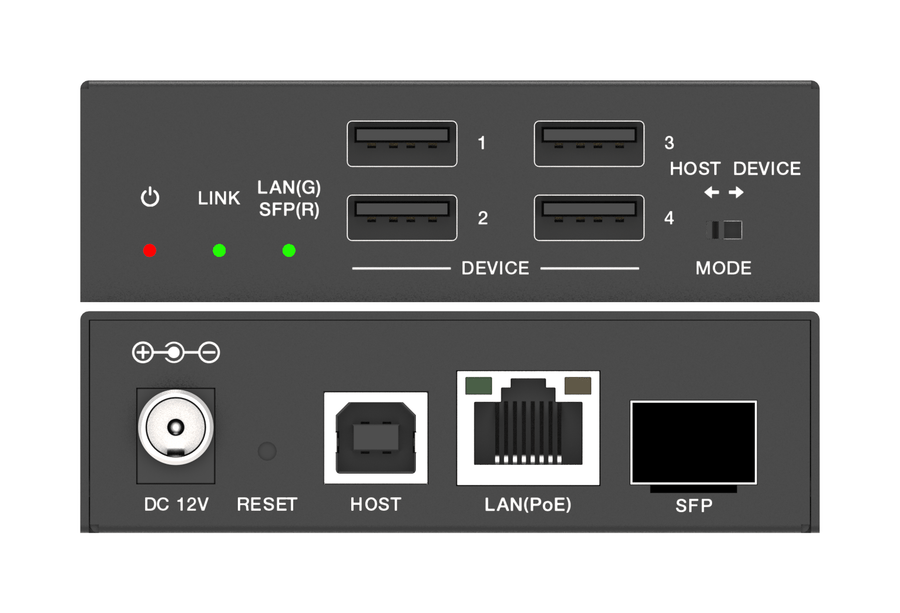
Puts four USB 2.0 ports wherever the building network reaches, with no dedicated cable run between the computer and its peripherals. The EXT-USB2IP is a compact black metal unit (3.35 x 4.63 x 1.00 in) that carries USB 2.0 at up to 480Mbps across a managed 1GbE network over RJ45 copper or SFP fiber. A switch on the panel sets each unit as the Host, which takes one Type-B connection to the computer, or the Device, which gives four Type-A ports for peripherals. Power comes from PoE as an IEEE 802.3at Class 4 or 802.3af powered device, or from the included 12V locking supply, so the far end needs no outlet. It is the right choice for conference rooms, lecture halls, control rooms and dispatch centers where reaching across the existing LAN matters more than USB 3.0 bandwidth or a point-to-point cable.
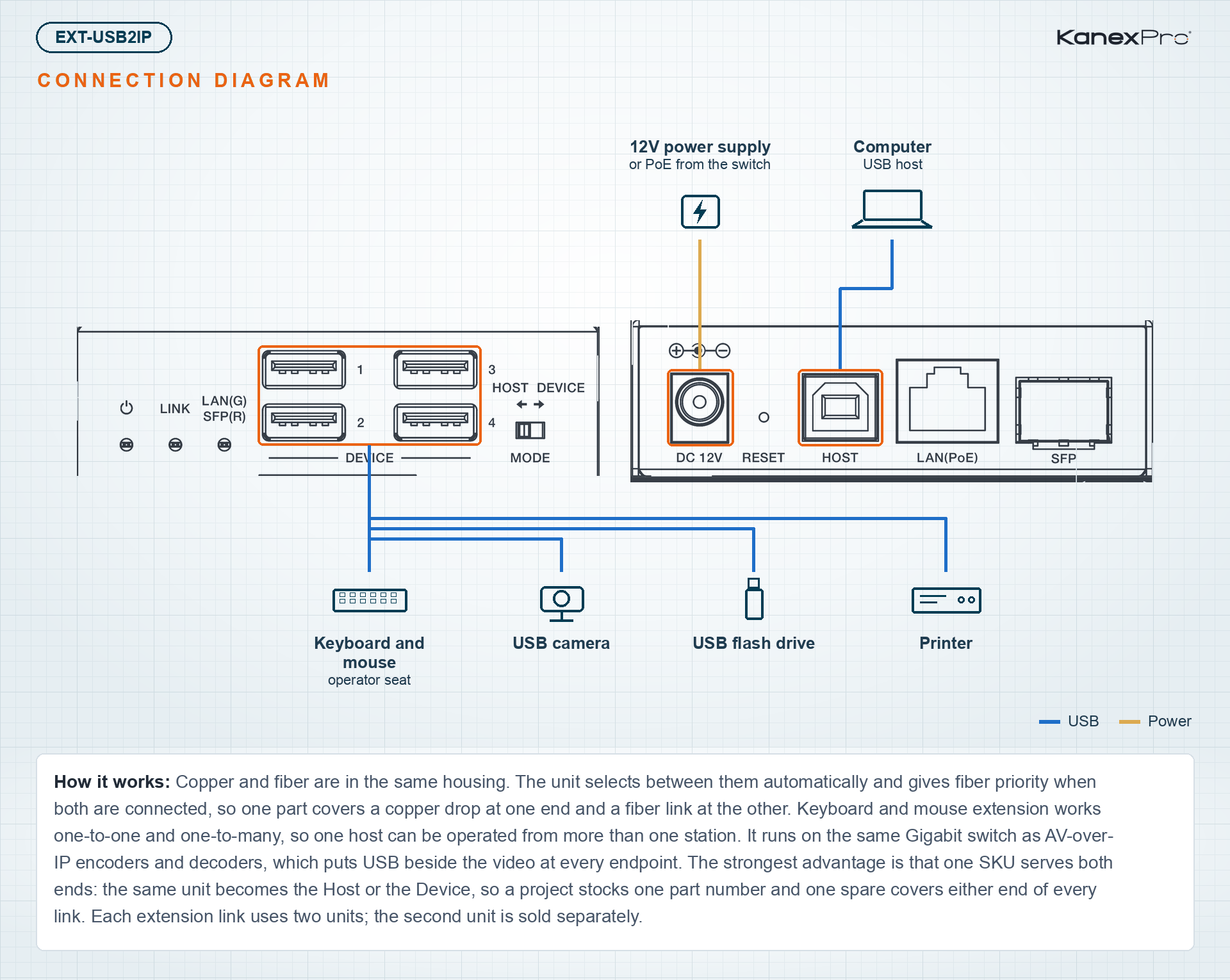
Copper and fiber are in the same housing. The unit selects between them automatically and gives fiber priority when both are connected, so one part covers a copper drop at one end and a fiber link at the other. Keyboard and mouse extension works one-to-one and one-to-many, so one host can be operated from more than one station. It runs on the same Gigabit switch as AV-over-IP encoders and decoders, which puts USB beside the video at every endpoint. The strongest advantage is that one SKU serves both ends: the same unit becomes the Host or the Device, so a project stocks one part number and one spare covers either end of every link. Each extension link uses two units; the second unit is sold separately.
- USB 2.0 extension over a 1GbE network, with data at up to 480Mbps through the Type-B USB Host port
- One USB Host port (Type-B) and four USB 2.0 Device ports (Type-A)
- Host and Device functions built into one unit; a mode switch selects the role
- 1G RJ45 copper and 1G SFP fiber ports with automatic selection; fiber takes priority when both are connected, and either port can also be selected manually
- One-to-one USB data transmission with configurable pairing, parameter settings and device discovery
- Keyboard and mouse (KM) extension, one-to-one and one-to-many
- Works with USB flash drives, cameras, printers, fax machines, touch panels, keyboards, mice and other USB 2.0 devices
- Power over Ethernet as a powered device (PD): IEEE 802.3at Class 4, also compatible with 802.3af; the included 12V/2.5A locking supply takes priority when both are present
- Up to 5V 1A from each Device port on local power, 5V 0.9A per port on 802.3at PoE, and 5V 1.2A total on 802.3af PoE
- Up to 328ft (100m) to the network switch over CAT6/6A/7
- Discoverable on the network with Bonjour (mDNS); defaults to Auto IP (169.254.x.x) after a reset
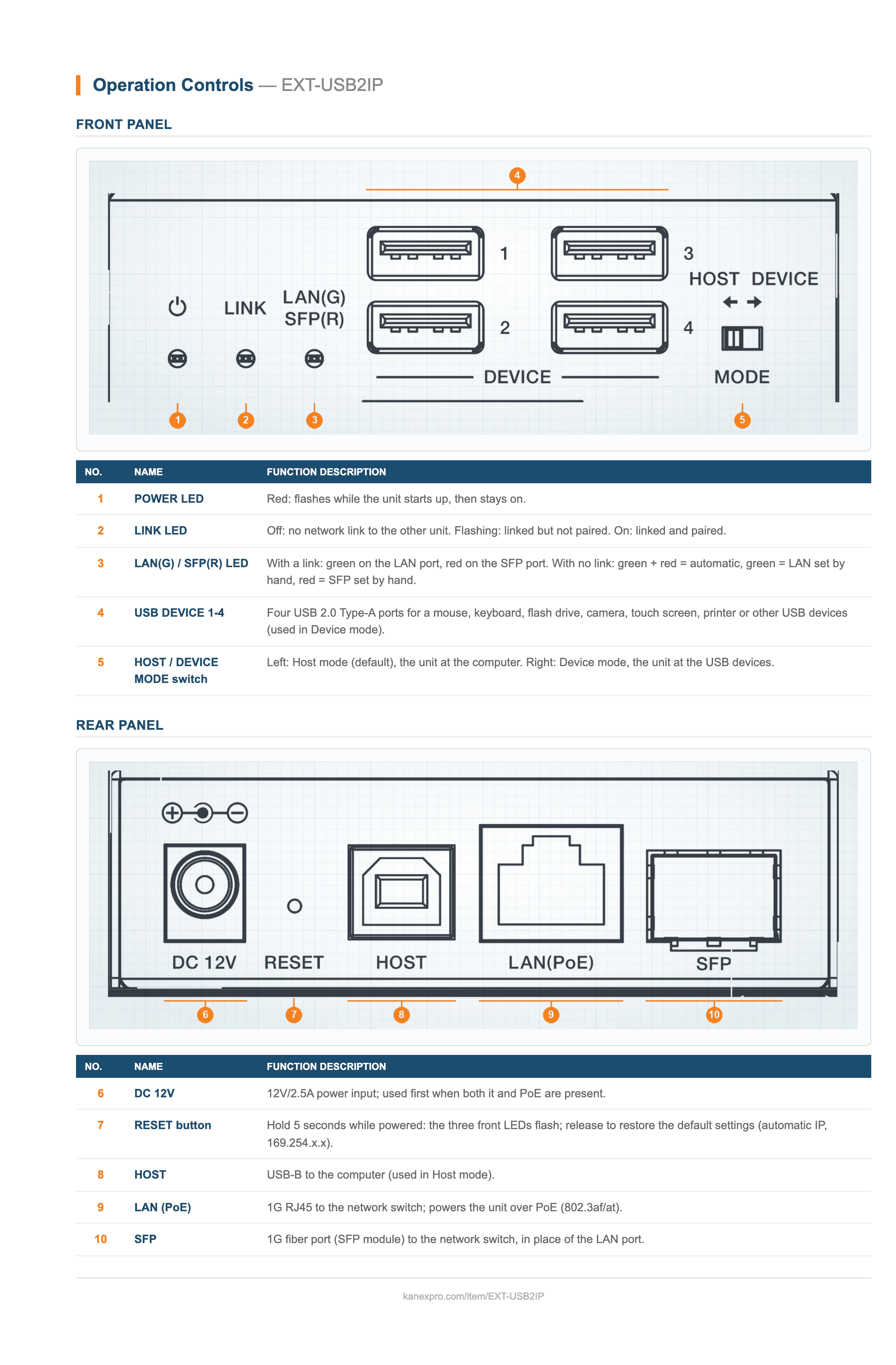
- Front-panel POWER, LAN/SFP and LINK LEDs show power, the active port and pairing status
- ESD protection to IEC 61000-4-2: +/-15kV air-gap, +/-8kV contact
- Compact black metal enclosure; mounting ears and screws included
| Technical | |
| USB Standard | USB 2.0, maximum data rate 480Mbps |
| Network Bandwidth | 1Gbps |
| Maximum Transmission Distance | 328ft (100m) over CAT6/6A/7 |
| Port Selection | Automatic copper/fiber detection (default), fiber priority; LAN or SFP selectable manually |
| USB Device Port Power, 12V Local Power | 5V 1A per port (four ports) |
| USB Device Port Power, PoE 802.3at | 5V 0.9A per port (four ports) |
| USB Device Port Power, PoE 802.3af | 5V 1.2A total across all four ports |
| Keyboard / Mouse Extension | One-to-one and one-to-many |
| Device Discovery | Bonjour (mDNS) |
| Default IP Mode | Auto IP (169.254.x.x) |
| ESD Protection | IEC 61000-4-2: +/-15kV (air-gap discharge), +/-8kV (contact discharge) |
| Connections | |
| USB Host | 1x USB Type-B, 4-pin female |
| USB Device | 4x USB 2.0 Type-A, 4-pin female |
| LAN | 1x 1G RJ45, PoE (IEEE 802.3at / 802.3af) |
| Fiber | 1x 1G SFP |
| Power Input | 1x DC 12V, locking |
| Controls and Indicators | |
| Mode Switch | HOST/DEVICE slide switch: left for Host (default), right for Device |
| Reset Button | Hold 5 seconds with power on to reset it to KanexPro default settings |
| POWER LED (Red) | Flashing during startup, on when ready, off when powered down |
| LAN/SFP LED (Green/Red) | Active port: green for LAN, red for SFP. With no link: yellow for auto detect, green for LAN selected, red for SFP selected |
| LINK LED (Green) | Off: no network link. Flashing: linked, not paired. On: linked and paired |
| Network Switch Requirements | |
| Switch Type | Layer 3 / managed switch |
| Bandwidth | Gigabit |
| Multicast | IGMP snooping |
| Recommended Models | Cisco SG500, Cisco Catalyst series, Huawei S5720S-28X-PWR-LI-AC, ZyXEL GS2210, Luxul AMS-4424P |
| Power | |
| Power Supply | Input: 100–240V AC, 50/60Hz; Output: 12V DC, 2.5A |
| PoE | IEEE 802.3at (Class 4) and 802.3af, PD mode |
| Power Priority | Local 12V supply takes priority over PoE |
| Power Consumption | Host: 1.92W (max); Device: 2.76W (max) |
| Physical | |
| Enclosure | Metal |
| Color | Black |
| Dimensions (W x D x H) | 3.35 x 4.63 x 1.00 in (85 x 117.5 x 25.5 mm) |
| Weight | 0.65 lbs (297 g) |
| Environmental | |
| Operating Temperature | 32°F to 104°F (0°C to 40°C) |
| Storage Temperature | -4°F to 140°F (-20°C to 60°C) |
| Relative Humidity | 20% to 90% RH, non-condensing |
| Certifications | |
| Power Supply | CE / FCC / UL |
| ESD | Tested to IEC 61000-4-2 |
| Package Contents | |
| 1x | USB 2.0 over IP 1GbE Network Extender |
| 1x | 12V/2.5A locking power supply |
| 2x | Mounting ear |
| 4x | Machine screw (KM3x6) |
What USB data rate does the EXT-USB2IP support?
How far apart can the two units be over copper cable?
How do I find the units' IP addresses on the network?
Can the extenders share a network with AV-over-IP video encoders and decoders?
How do I set a unit as the Host or the Device?
What does the network switch need to support?
The LINK LED is off. What should I check?
The LINK LED keeps flashing and USB does not pass through. What should I check?
How many units do I need for one extension link?
Does it need a dedicated cable, or can it run over the existing network?
Ask Claude, ChatGPT or Copilot about the EXT-USB2IP: its specifications, your price, stock, and a draft order for you to place. Or wire the REST API into your quoting tool or ERP.