
4K60 H.265/H.264 HDMI Streaming Encoder — RTMP Push & RTSP
Stream Live Without a Capture PC — Direct RTMP Push, Multicast RTSP & TS/UDP, Audio-Only Stream, 802.3af PoE over 1G
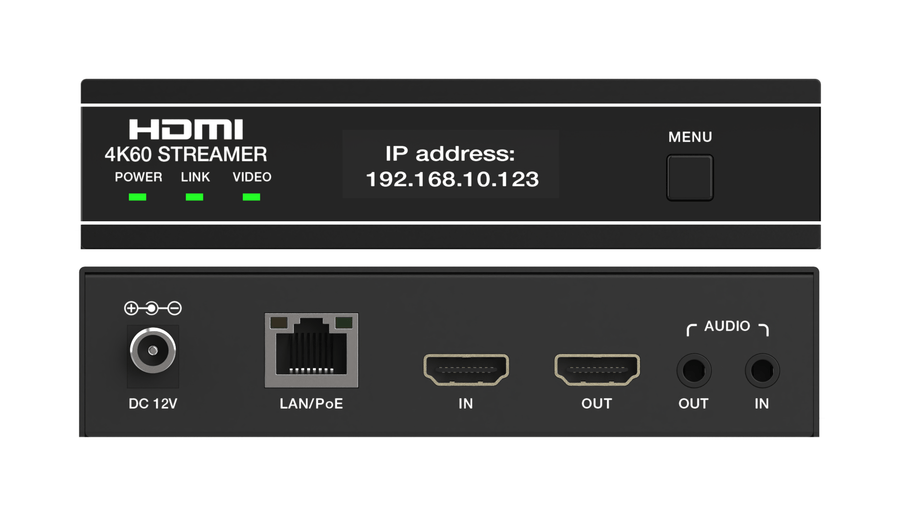
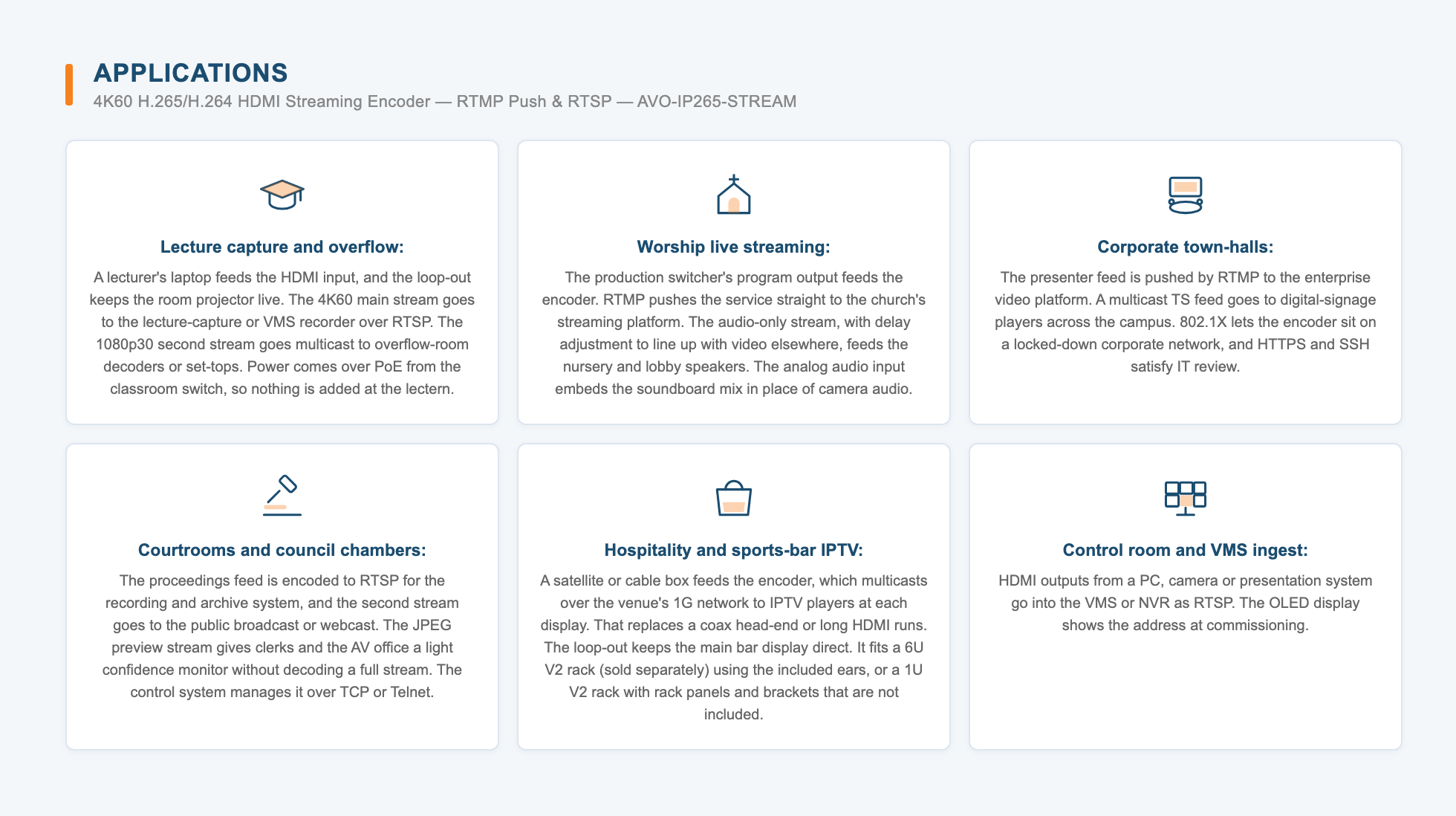
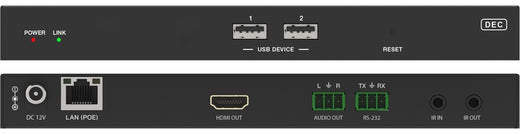
Streams a 4K60 HDMI source live to a streaming platform, the local network and a preview monitor at once, without a capture PC. The AVO-IP265-STREAM encodes the full 3840x2160 signal at up to 60Hz in H.265 or H.264, rather than taking 4K in and encoding only 1080p. It also runs a 1080p30 second stream and a 1280x720 JPEG preview stream at the same time. The compact 5.12 x 6.30 x 1.18 in metal unit draws 7.2W and runs on 802.3af PoE from the network switch, or on the included 12V locking adapter. It fits 1U or 6U V2 rack installations, so a full rack of streamers takes very little space. It is the right choice for lecture halls, houses of worship, town-hall rooms and IPTV venues where a true 4K60 encode and direct platform push matter more than a PC, capture card and software encoder at every source.
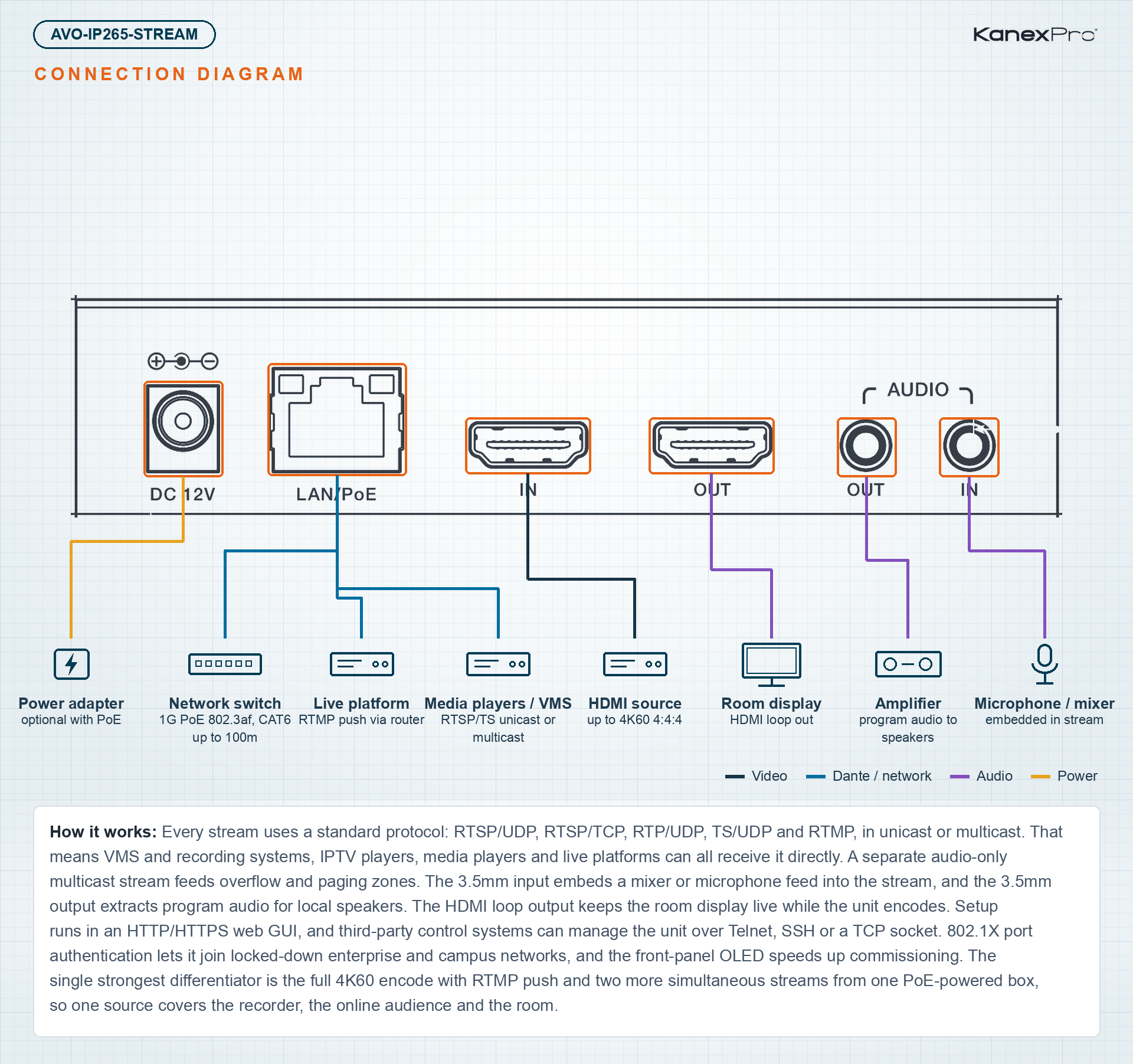
Every stream uses a standard protocol: RTSP/UDP, RTSP/TCP, RTP/UDP, TS/UDP and RTMP, in unicast or multicast. That means VMS and recording systems, IPTV players, media players and live platforms can all receive it directly. A separate audio-only multicast stream feeds overflow and paging zones. The 3.5mm input embeds a mixer or microphone feed into the stream, and the 3.5mm output extracts program audio for local speakers. The HDMI loop output keeps the room display live while the unit encodes. Setup runs in an HTTP/HTTPS web GUI, and third-party control systems can manage the unit over Telnet, SSH or a TCP socket. 802.1X port authentication lets it join locked-down enterprise and campus networks, and the front-panel OLED speeds up commissioning. The single strongest differentiator is the full 4K60 encode with RTMP push and two more simultaneous streams from one PoE-powered box, so one source covers the recorder, the online audience and the room.
- 4K@60Hz H.264/H.265 (HEVC) Ultra HD encoder
- HDMI 2.0b input with 18Gbps video bandwidth, accepting up to 4K@60Hz 4:4:4
- Three simultaneous streams: 4K@60Hz H.264/H.265 main stream, 1080p@30 H.264 second stream and 1280x720@5 JPEG image stream
- RTSP/UDP, RTSP/TCP, RTP/UDP, TS/UDP and RTMP stream standards
- Main stream output up to 4K60Hz; second stream output up to 1080p30Hz
- Unicast and multicast streaming
- Audio-only multicast stream
- LPCM 2-channel audio at 48kHz
- Stream control (play/pause/stop) for each stream
- Adjustable bitrate (VBR/CBR), resolution, frame rate, GOP and EDID
- API control for third-party control systems over a Telnet/SSH login or a TCP socket connection
- Control and management in an HTTP/HTTPS web GUI
- 802.1X port authentication
- Image preview and signal distribution
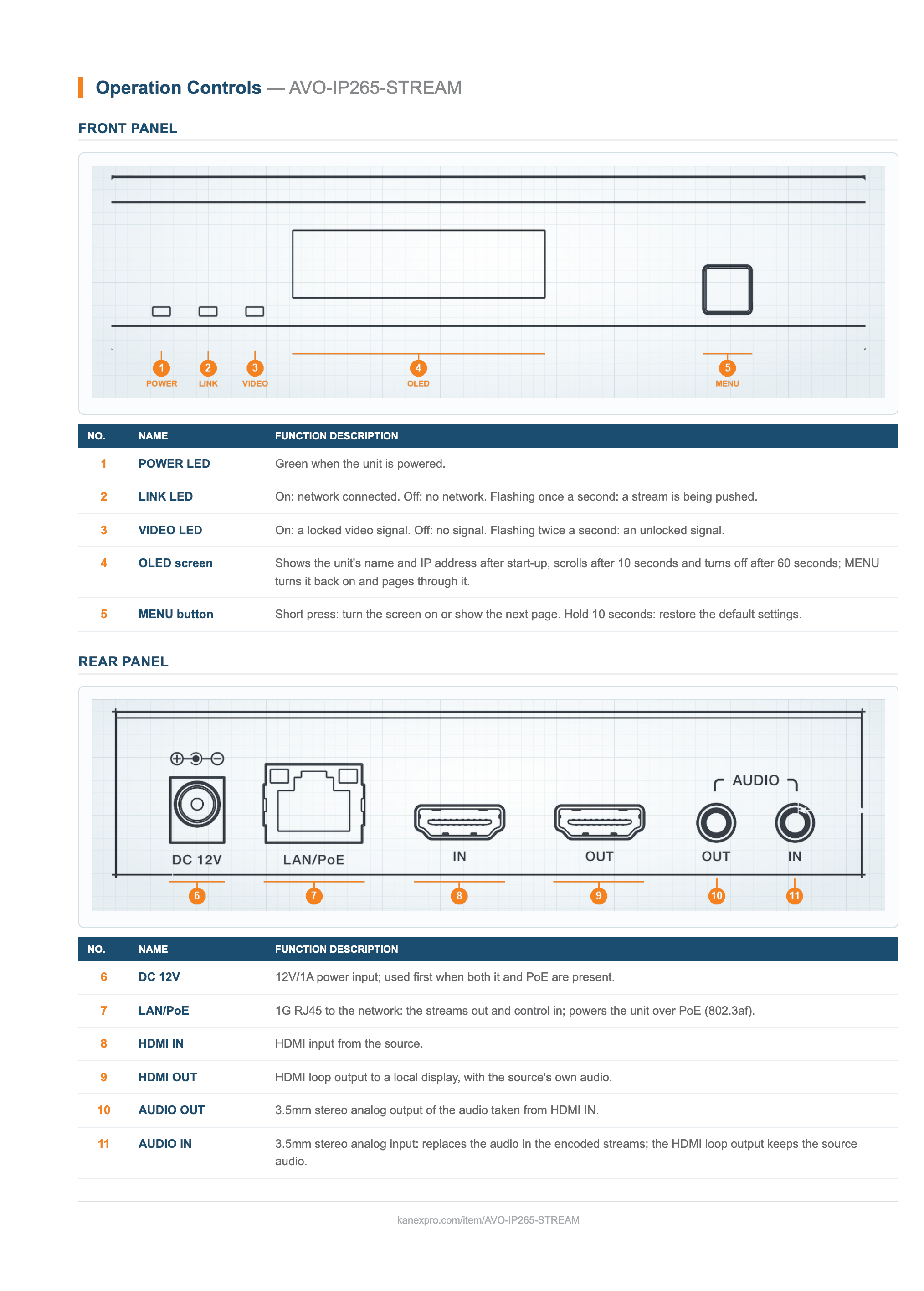
- HDMI loop output for a local display
- Analog audio embedding and extraction over 3.5mm input and output
- 100M/1G Ethernet port with PoE (802.3af powered device)
- OSD text overlay, uploadable splash screen and configuration save/load
- Fits 1U and 6U V2 rack installations
- OLED display showing device name and IP address
- Works with RelayAV, KanexPro's control app: starting and stopping each stream and the live RTMP push, push addresses and stream keys, HLS, RTSP and multicast delivery, codec, resolution, bitrate and frame rate for both streams, the sound source, text and stream info on the picture, and the box's name, fan and front-button lock, from the RelayAV app
| Video | |
| Encoding | H.265 / H.264 (main stream); H.264 (second stream); JPEG (image stream) |
| Video Bandwidth | 18Gbps |
| HDMI Compliance | HDMI 2.0b |
| Input Video Resolution | Up to 4K@60Hz 4:4:4 |
| Main Stream Resolution | Same as input, 3840x2160, 1920x1080, 1280x720, 640x480 |
| Second Stream Resolution | 1920x1080, 1280x720, 640x480 |
| Image Stream | 1280x720 JPEG at 5fps |
| Push Stream Frame Rate | 5–60Hz |
| Color Space | HDMI input: RGB, YCbCr 4:4:4 / 4:2:2 / 4:2:0; push stream encoding: 4:2:0 |
| Color Depth | HDMI input: 8/10/12-bit; push stream output: 8-bit |
| HDR | Not supported |
| Bitrate Control | VBR / CBR, adjustable bitrate |
| Second Stream H.264 Level | Baseline, Main, High |
| Streaming | |
| Stream Protocols | RTSP/UDP, RTSP/TCP, RTP/UDP, TS/UDP, RTMP |
| Transport | Unicast and multicast |
| Push Streams | Main and second stream RTMP push |
| Audio-Only Stream | Multicast, LPCM |
| Audio | |
| Audio Format | LPCM 2CH, 48kHz |
| Audio Source | HDMI or analog (selectable) |
| Audio Latency | < 60ms |
| Audio Parameters (L/R Out) | |
| Output Impedance | 330 Ohms |
| Line Input/Output Level (Max.) | 2Vrms |
| Frequency Response | 20Hz–20kHz (+0.5dB / -1dB) |
| S/N Ratio | > 90dB @ 2Vrms, 1kHz, A-weighted |
| THD+N | < 0.05% @ 2Vrms, 1kHz |
| Connections | |
| Inputs | 1 x HDMI IN (Type A, 19-pin female); 1 x AUDIO IN (3.5mm jack) |
| Outputs | 1 x HDMI OUT loop (Type A, 19-pin female); 1 x AUDIO OUT (3.5mm jack) |
| Network | 1 x LAN/PoE (RJ45, 802.3af PoE) |
| Network & Control | |
| Network Video Bandwidth | 1G |
| Transmission Distance | 16 ft (5 m) over HDMI; 328 ft (100 m) over CAT6/6A/7 |
| IP Mode | DHCP or static |
| Default IP Address | 169.254.1.11 |
| Network Security | 802.1X; HTTPS web GUI |
| Control | HTTP/HTTPS web GUI; API over Telnet/SSH or TCP socket; RelayAV |
| Time Sync | NTP |
| Front Panel | OLED display, MENU button, POWER / LINK / VIDEO LEDs |
| Power | |
| Power Supply | Input: AC 100–240V, 50/60Hz; output: DC 12V/1A (US/EU standards) |
| PoE | 802.3af, powered device (PD) |
| Power Consumption | 7.2W |
| Physical | |
| Dimensions (W x D x H) | 5.12 x 6.30 x 1.18 in (130 x 160 x 30 mm) |
| Weight | 1.45 lbs (0.659 kg) |
| Housing | Aluminum and iron |
| Color | Black |
| Mounting | 1U and 6U V2 rack compatible |
| Environmental | |
| Operating Temperature | 32–104°F (0–40°C) |
| Storage Temperature | -4–140°F (-20–60°C) |
| Relative Humidity | 20–90% RH (non-condensing) |
| ESD Protection | IEC 61000-4-2: +/-15kV air-gap discharge, +/-8kV contact discharge |
| Certifications | |
| Power Adapter | CE / FCC / UL |
| Package Contents | |
| 1 | AVO-IP265-STREAM AV streamer |
| 1 | 12V/1A locking power adapter |
| 2 | Mounting ears |
| 4 | Machine screws (KM3x6) |
What resolutions can the main and second streams be encoded at?
What frame rate and bitrate settings are available?
How do I stream live to YouTube?
How do I play the RTSP or TS stream on a PC?
How do I find the unit and open its web interface for the first time?
Can it join a network that uses 802.1X port authentication or HTTPS-only management?
The stream shows no picture. What should I check?
I cannot reach the web interface.
Does it actually stream in 4K, or does it only accept a 4K input?
Which platforms and players can receive the stream?
Ask Claude, ChatGPT or Copilot about the AVO-IP265-STREAM: its specifications, your price, stock, and a draft order for you to place. Or wire the REST API into your quoting tool or ERP.